| LEARN COMPOSITE STEP BY STEP | |
|
STEP NO. 14 : Column
and Project Quantities And Cost |
|
 |
|
 |
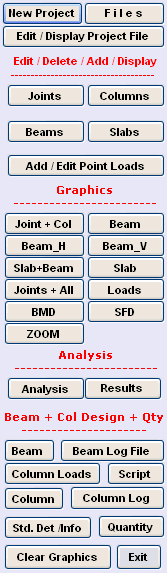
When Program starts, the Menu above is
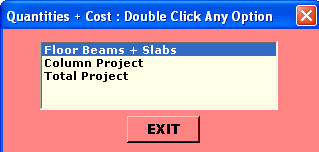
displayed. Under the Beam + Column Design + QTY Heading following options are displayed. ● Beam ● Beam Log File ● Column Loads ● Script ● Column ● Column Log ● Standard Details ● Quantities ● Clear Graphics ● Exit Now Click on " Quantity " Option. Following Message is displayed. |
 |
|
|
|
Now Double Click
" Column Project " Option. Following Graphics is displayed.
(Quantities and Cost of Floor Beams + Slabs are already Covered in Step 10). |
|
|
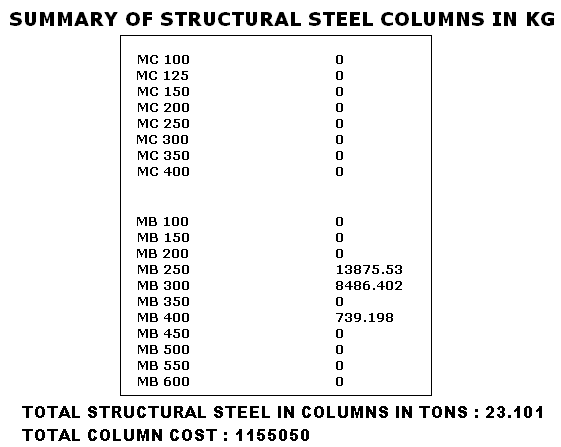
Unless All relevant Floors of the Building are Analyzed and Beam and Columns are Designed, Column Loads worked out, the Calculation of Quantities & Cost of Column / Project have no meaning. The Quantity Option is to be RUN last after all other things are completed. Click Yes if complied. Select Your Project File from Window Dialogue Box (Example.Dat in My case) & Click Open. Following Graphics is Displayed. |
 |
|
|
|
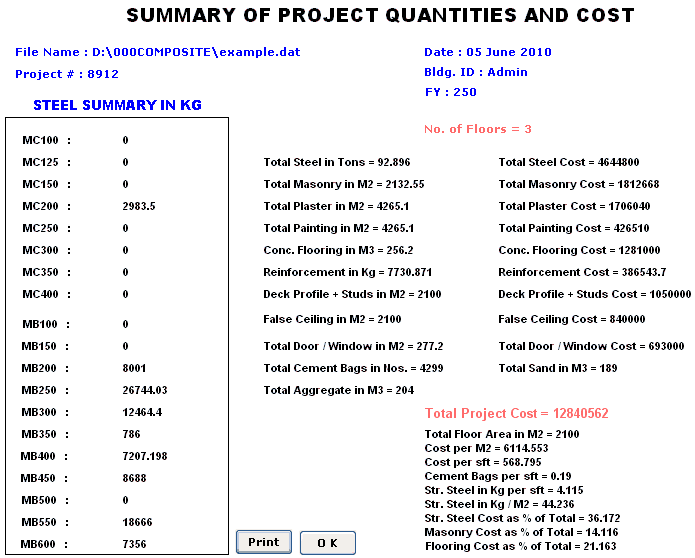
Click OK to Exit. Now Double Click " Total Project " Option. Select your File from Window Dialogue Box & Click Open. Following Graphics is displayed. |
 |
|
|
|
This Completes Learning Steps. |
| STEP NO. 14 IS OVER. |
|


|
|