with Windows 7 & Windows 8
However Softwares will work on Laptops / Desktops where Windows 8
(Enterprise /Pro ) has been installed after formatting Windows XP or Windows 7
system.

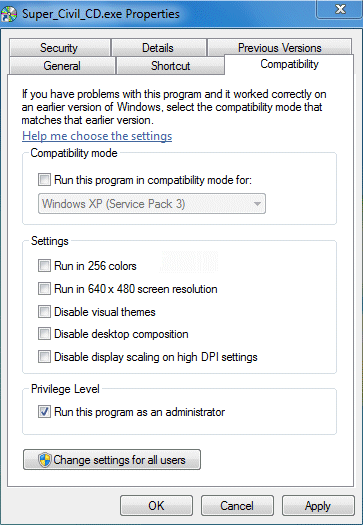
A. Always Run as administrator for Window 7 & Window 8 .
All Super Civil CD Softwares should be run as administrator.
In order to run any software as administrator, Right click its Desktop icon and Select Properties.
B. In case of any problem with registration of comdlg32.ocx file,
a user may follow these steps.
If windows is located in C: then directory location will be C:\windows\system32.
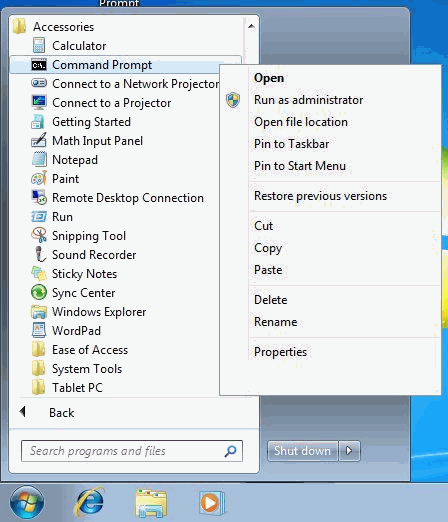
Right Click on Command Prompt , then click on Run as administrator as shown below.
3.
The Command Prompt will open up.
You will see a message saying "DllRegisterServer ... succeeded
C. Registering OCX files for QTY and ROAD ESTIMATE SOFTWARES
C:\Program Files (x86)\Road_Estimate
You will see a message saying "DllRegisterServer ... succeeded
You will see a message saying "DllRegisterServer ... succeeded
You will see a message saying "DllRegisterServer ... succeeded
C:\Windows\SysWOW64S\Msjetoledb40.dll ( For 64 bit)
C:\Windows\SysWOW64S\Msjet40.dll ( For 64 bit)
If dll files are missing, download here.
Access Database Engine (For Office 2007)
Access Database Engine (For Office 2010)
E. On 64
Bit Windows (x64) download & install runtime.
For Windows 7 (64 bit Version) , Windows Edition should be Ultimate, Professional , Enterprise or Home Premium Only.
For Windows 7 (32 bit Version) , Windows Edition may be Ultimate, Professional, Enterprise , Home Premium , Home Basic or Starter.
On 64 Bit Windows (x64) download and install runtime
by clicking following link.
http://www.microsoft.com/downloads/details.aspx?FamilyID=b44a0000-acf8-4fa1-affb-40e78d788b00
Download and Install Microsoft Power Packs
G. Following Run Time Files are
Required .
If it is not there in your computer OR Run Time / Print Error is
Reported, then download , Run on
your computer & Re-Start.
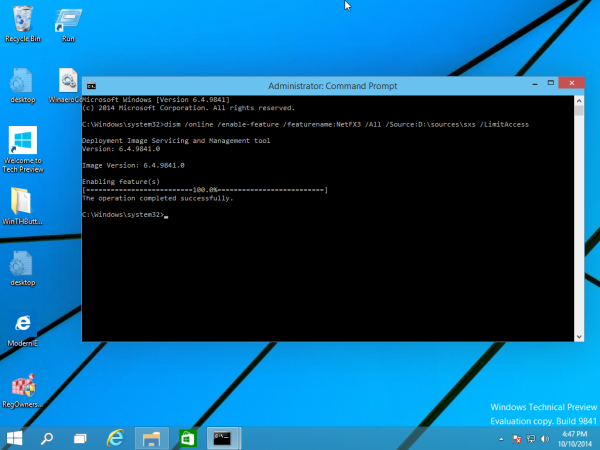
H. Offline Install of .Net Framework 3.5 in Windows 10
If .Net Framework 3.5 install Error is generated in Windows 10, do the following:
1. Insert Windows 10 DVD in the Disk Drive.
2. Download net35.zip , extract it from the ZIP archive to the Desktop, right click it and choose Run as administrator as shown below.